OCRFix: Botnet Trojan delivered through ClickFix and EtherHiding
During routine analysis, CYJAX identified a typosquatting phishing campaign which impersonated the Optical Character Recognition (OCR) tool Tesseract OCR. What originally appeared to be a ClickFix attack evolved into a sophisticated campaign delivering multi-stage malware deployments. The campaign, which CYJAX has titled OCRFix, made use of heavy obfuscation and defence evasion techniques, including EtherHiding.


Introduction
During routine analysis, CYJAX identified a typosquatting phishing campaign which impersonated the Optical Character Recognition (OCR) tool Tesseract OCR. What originally appeared to be a ClickFix attack evolved into a sophisticated campaign delivering multi-stage malware deployments. The campaign, which CYJAX has titled OCRFix, made use of heavy obfuscation and defence evasion techniques including EtherHiding.
This campaign is a key example of the importance of both effective phishing and network protections, both from a technical and human perspective. The combination of the well-known ClickFix technique with more advanced techniques such as EtherHiding gives a unique perspective on how threat actors can elevate their attack chains to target individuals.
This blog will explore the discovered phish; how the ClickFix attack functions; the delivered malware; and the unique techniques used throughout.
Technical analysis
Initial phish and ClickFix
CYJAX has identified a typosquatting page of tesseract-ocr[.]com, which impersonated the legitimate tool Tesseract OCR. It is designed to allow users to extract text from images and is managed through a GitHub repository. The tool does not appear to host its own website, making it a key target for typosquatting attacks and domain impersonation.
From analysis of the phishing URL, CYJAX found one instance which contained a UTM source parameter linking to the popular large language model (LLM) ChatGPT. This suggests that in addition to the domain squatting, the malicious page may have been used to conduct LLM poisoning so that ChatGPT recommends the site to users. A YouTube video posted by Eric Parker appears to show ChatGPT recommending the site and highlights its LLM SEO poisoning techniques. Alongside this, the site uses both malicious Google Ad campaigns and traditional SEO poisoning.
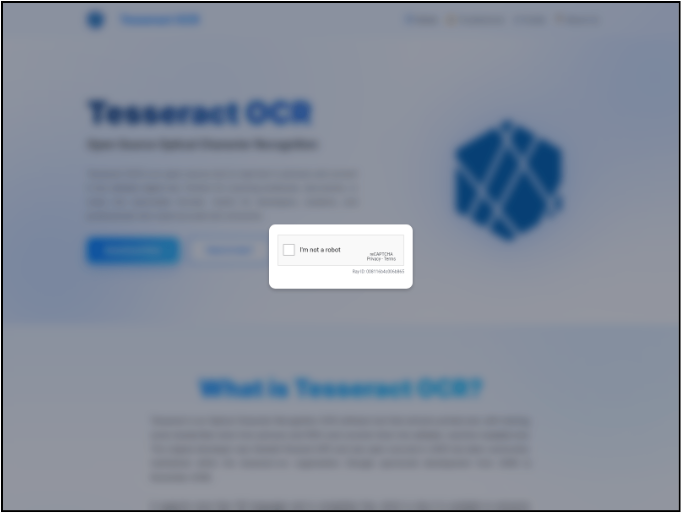
Upon visiting the landing page, the phishing website requested users complete a CAPTCHA to view the content. This is standard for many ClickFix campaigns, with the page content being hidden from view.
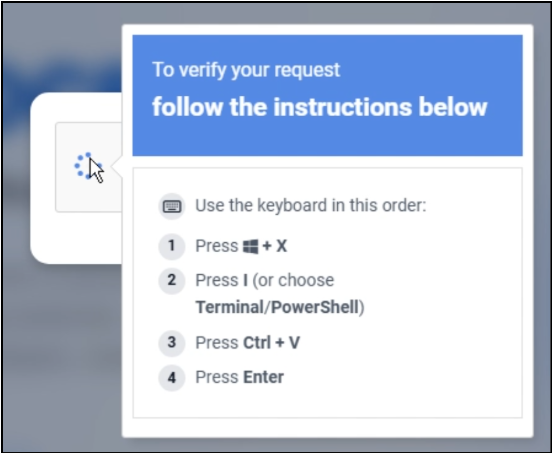
Users were then instructed to open Windows PowerShell and paste a command into it to become verified. The command was automatically copied to user clipboards when they interacted with the CAPTCHA, meaning they were not further alerted to the malicious activity.
This command contained a large amount of decimal encoded text and instructions that decoded and assembled a command using substring and XOR operations. A partially de-obfuscated version of the code can be found below.

Analysis of the decoded command shows that a Microsoft Net.WebClient is created, which then connects to an initial download site called opsecdefcloud[.]com. This site then returned the MSI executable file named 98166e51.msi, which dropped the first of three malware payloads.
Once the ClickFix attack was successful, victims were forwarded to the legitimate site which contained download links and guides that connected back to its GitHub. This suggests a coordinated effort by the operator to ensure that compromise went unnoticed by victims. Additionally, this may possibly be a tactic to encourage victims to positively discuss the page, which could lead to more site visitors.
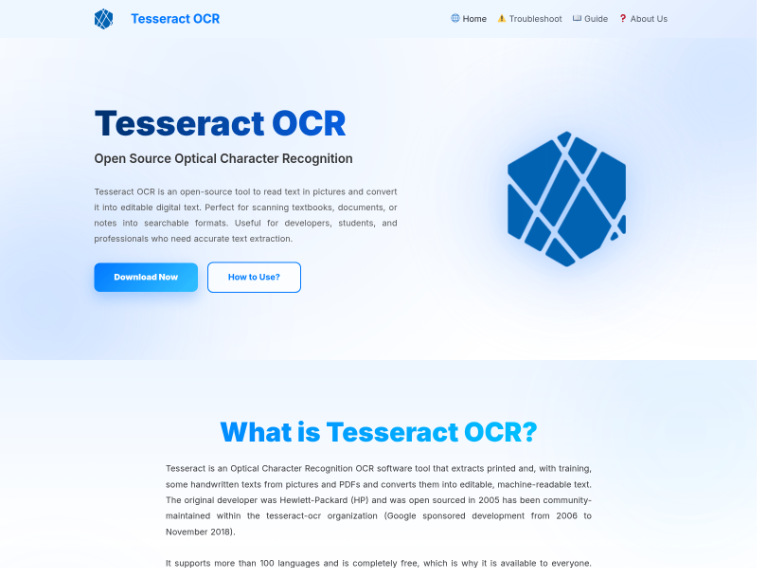
Further analysis of the site shows links to 12 social media accounts on platforms such as Facebook, Instagram, YouTube, Pinterest, Tumbler, Twitch, and DeviantArt. These accounts have little to no interaction or posts on them, with many showing that they were created on 14 November 2025. These accounts may have been used as alternate lure methods or to make the site appear more legitimate to search engines.
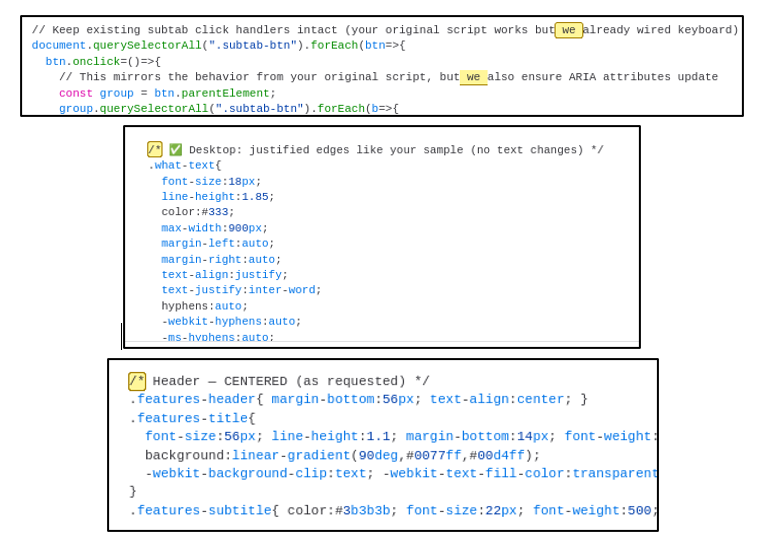
Additionally, CYJAX analysed the source code of the website and found that it contained excessive comments. Some of these used emojis or terminology such as “we” or “your” alongside em-dashes. This is often observed in code which has been generated using LLMs and likely indicates that this is an AI assisted cyberattack.
EtherHiding
Within this campaign, a unique method to hide the malicious C2 domains was used by the threat actor. This technique is known as EtherHiding and occurs when key information is hidden on blockchains such as Ethereum or BNB through smart contracts. Within this campaign, three pieces of information were hidden via smart contracts. Each of these were then used at a different stage of the malware delivery.
The threat actor used the BNB Smart Chain TestNet, a mirrored sandbox network which allows contracts to be deployed without requiring funds to be raised. In this campaign three separate addresses were used. These are as follows:
- 0x7a09296149Ad75745d805CFc4ce215573b442F90 – Stage 1
- 0xdd3bd9879e5a3bb6c6b0eb193c99418e5c8ba6c9 – Stage 2
- 0xaC72Bf7B66411463533F2a5bBc613e6083F82098 – Stage 3
Within these contracts, a series of mirrored transactions can be found, each from the same BNB address.
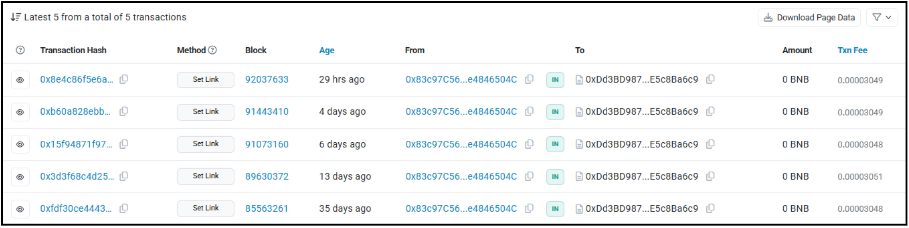
The malware used a service known as PublicNode to query each of these smart contracts. This returned the data contained within the most recent of these transactions, which appears to be a number of different C2 URLs that are used to deliver subsequent stages of the malware.

By analysing the code behind the smart contract, it takes a secretLink variable which can be changed and requested. As such these transactions are likely how the threat actor uses and modifies the C2 domains when they are taken down.
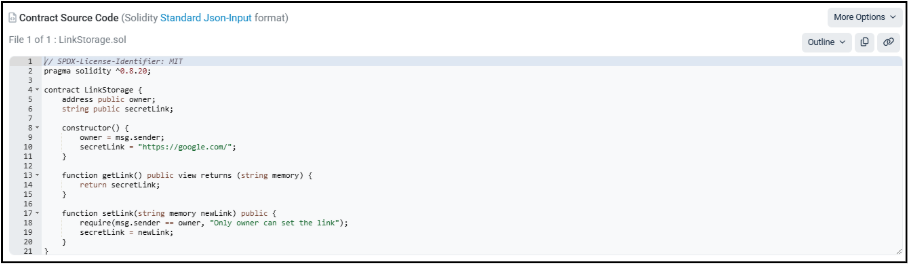
This method adds a level of sophistication to the attack, which has previously been used by the North Korean threat actor UNC5342 to hide information on blockchains. A level of obfuscation and persistence is added to the campaign, with the malware making requests to legitimate external services hosting the C2 addresses. This is as opposed to the malware containing the links internally. As such, static detection of C2 addresses becomes harder and efficient rotation through the contract’s stored secretLink variable is enabled.
Delivered malware
After the initial MSI file is delivered to the target system, the campaign used a multi-stage approach to deliver its final payload. A series of three EXE files were used within the attack, each with an accompanying DLL file of the same name.
From analysis of the three EXE files, each has the same file hash. Each EXE file was actually a renamed version of a tool called VbsEdit Script Launcher, which is a launcher of compiled VBScript as part of the VbsEdit tool. This indicates why each main executable has an expired code certificate signed by Adersoft, which is likely used as an additional obfuscation technique.

Similarly, the DLL files do not appear to be actual DLL files but are instead executable files that contain malicious VBScript code. These are loaded by the VbsEdit Script Launcher executables, decoupling the malicious code. This is an unusual execution method and could be an attempt to obfuscate the malware. It is also possible that the threat actor behind this attack is repurposing existing knowledge of VBScript malware to conduct this attack via this unique execution method.
Stage one: Update1.exe – The loader
The first delivered executable is titled Update1.exe and is primarily responsible for loading more malicious elements of the campaign. The malware first makes a request to the first BNB TestNet smart contract and is returned the first C2 URL of dltruek[.]com/data. The malware then requests this domain using WinHTTPRequest, setting the referrer header as facebook[.]com. This returns a zip file titled data.zip, which is saved to the system as date_data.zip.
The malware then unpacks this zip into C:\Users\admin\AppData\Local\app_config, which contains the second stage executable of setup_helper.exe. Additionally, the malware creates an installation log file in which standard install messages are placed. This includes the time the malware began installation and confirmation messages which indicate that it was successful. After installation is complete, the file is deleted from the system; however, it is not clear why the malware does this. Given the previous indicators of AI enhanced development, it is possible that some automatic logging which holds no use within a malicious scenario has been implemented.
Stage two: setup_helper.exe – Secondary loader and persistence
Setuphelper.exe is the second stage of the malware and is responsible for both deploying and manipulating scheduled tasks to gain persistence for the final payload. This executable is run recursively using an infinite loop, ensuring that it remains active during the attack chain.
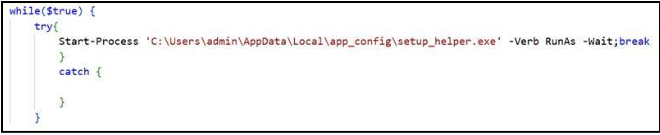
As with the previous executable, the first action the malware takes is to request the C2 URL stored at the second BNB TestNet smart contract address. The malware uses a different web library to make the request in this instance, specifically IServerXMLHTTPRequest2. This request returns the URL dltruek[.]com/test.php, which is used later in the execution chain.
After this, the malware makes a system request using the Windows Management Instruction (WMI) SWbemServicesEx. It uses this to request all UUIDs on the current system before sending this information as a post request to the previously requested C2 URL as a parameter titled “uuid”.
The malware checks for the existence of two log files, namely log_32.txt and log_64.txt. In the first instance of running, these log files do not exist, and the code has to create them. The program then runs an encoded PowerShell script and exits.

This PowerShell script appears to be used to disable protection mechanisms on the system, including BitLocker and TMP. It adds a number of exclusions for Windows Defender. As such, this is likely a defence evasion module to ensure that system defences are inhibited before final stage execution.
Due to the loop established previously, the setup_helper.exe script runs a second time. It operates identically to the first run, though it appears to continue its execution as the log files are now established. First, the malware attempts to write an exclusion path for the previously extracted app_config folder and the System32 directory from Windows Defender using the following commands.

The malware then makes a second request to the C2 for a file titled configpack.zip. This ZIP file is extracted by the malware and contains the final CfgHelper.exe payload.
Before executing the final payload, a persistence mechanism for the third stage is established through a scheduled task using the command shown below.

This causes the final payload to re-execute every five minutes with the highest level of privilege, ensuring that the listener is not interrupted during its execution.
Stage three: CfgHelper.exe – Bot listener
CfgHelper.exe follows the other two executables by grabbing a C2 address from the BNB TestNet. This returns the URL dltruek[.]com/helpU.php, which responds with the URL of the bot server, namely ldture[.]com, when requested.
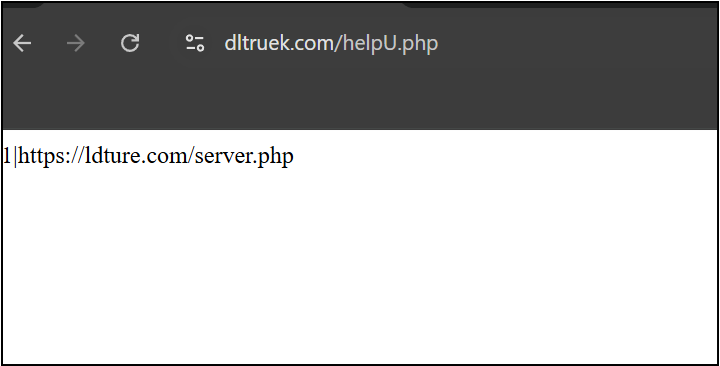
The malware then begins to harvest system information, including device name and ID and any open internal enabled IP addresses. It then sends a post request to the bot server’s “checkin [sic]” page, sending the collected information using the following format:
ip=<IP ADDRESS>&os=<OS NAME>&bot_id=<System UUID from 2nd Stage>&computer_name=<Device Name>&client_id=<Generated ID Number>
This information is continuously passed to the bot server every 60 seconds, with the server responding with active tasks the bot has been assigned. During analysis, CYJAX has not observed any tasks being delivered to infected endpoints.
The bot panel
From additional analysis of the final payload, the server which the malware makes regular requests to also hosts a website on its root domain of ldture[.]com. When visited, the page appears to host a bot control panel. This further indicates that the malware operator aims to build and maintain a botnet of compromised devices.
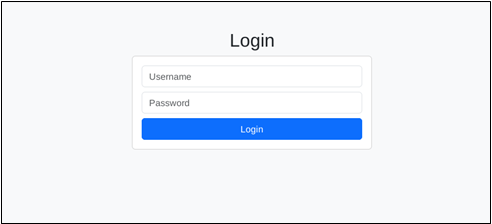
Accessing the main domain results in a simple login form, though the code logic behind the page suggests that the resulting control panel may be observable. This is because it uses HTML styles to hide the form and display panel as opposed to an actual authentication system.
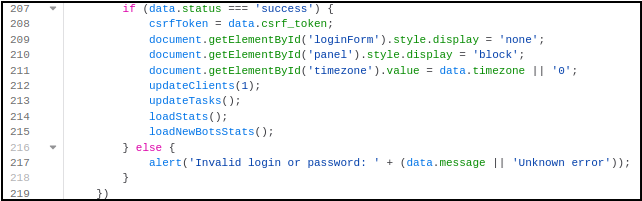
As such, CYJAX was able to analyse the observable HTML elements still available on the page. Once authenticated, the page likely appears as depicted in Figure 17 and contains several references to “Bots”. The main capability of the panel appears to be the creation of tasks which can be delivered to specific bots within the network. The control panel does not contain any known branding; however, the content suggests it is capable of managing infected hosts, particularly to deploy additional malware within the “Create Task section”. The panel allows the attacker to view active bots, which are synchronised every minute.
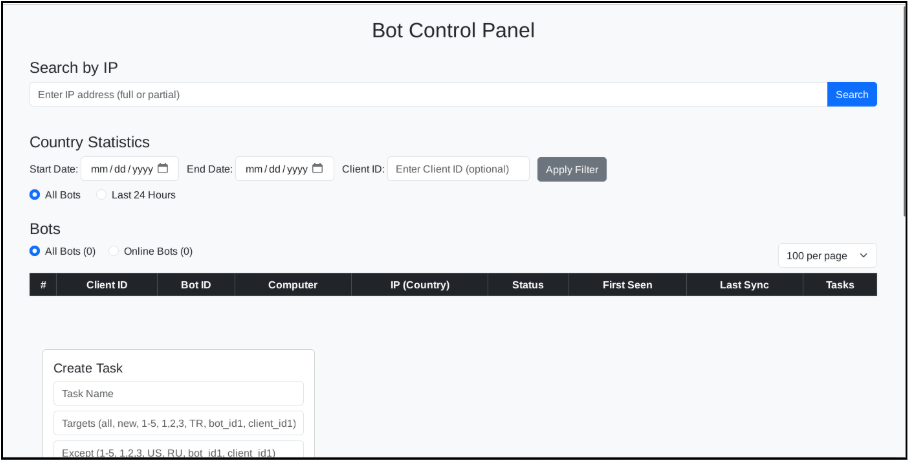
The “Create Task” section potentially allows the attacker to select active bots to download and execute scripts from. The optional DLL section also indicates possible further malware infection through techniques such as DLL sideloading.
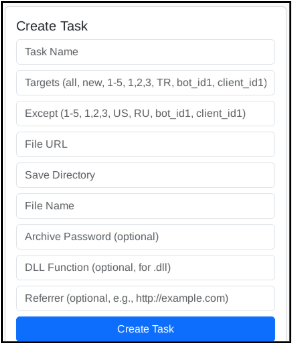
Pivoting on the artefacts within the C2 domain, CYJAX observed at least two additional domains hosting the panel, namely oklefe[.]com and ldveriz[.]com. Whilst the latter is unreachable, oklefe[.]com remains active at the time of writing and hosts an identical bot panel. It is currently unclear if these are old versions of the same campaign or separate ones using the same style of bot panel. It is also important to note throughout the HTML for the site, a number of comments are written in Cyrillic. This potentially indicates that the threat actor behind this attack may be of Russian origin; however, there is insufficient information within the attack chain to make a confident attribution to a known attacker or geolocation.
Conclusion
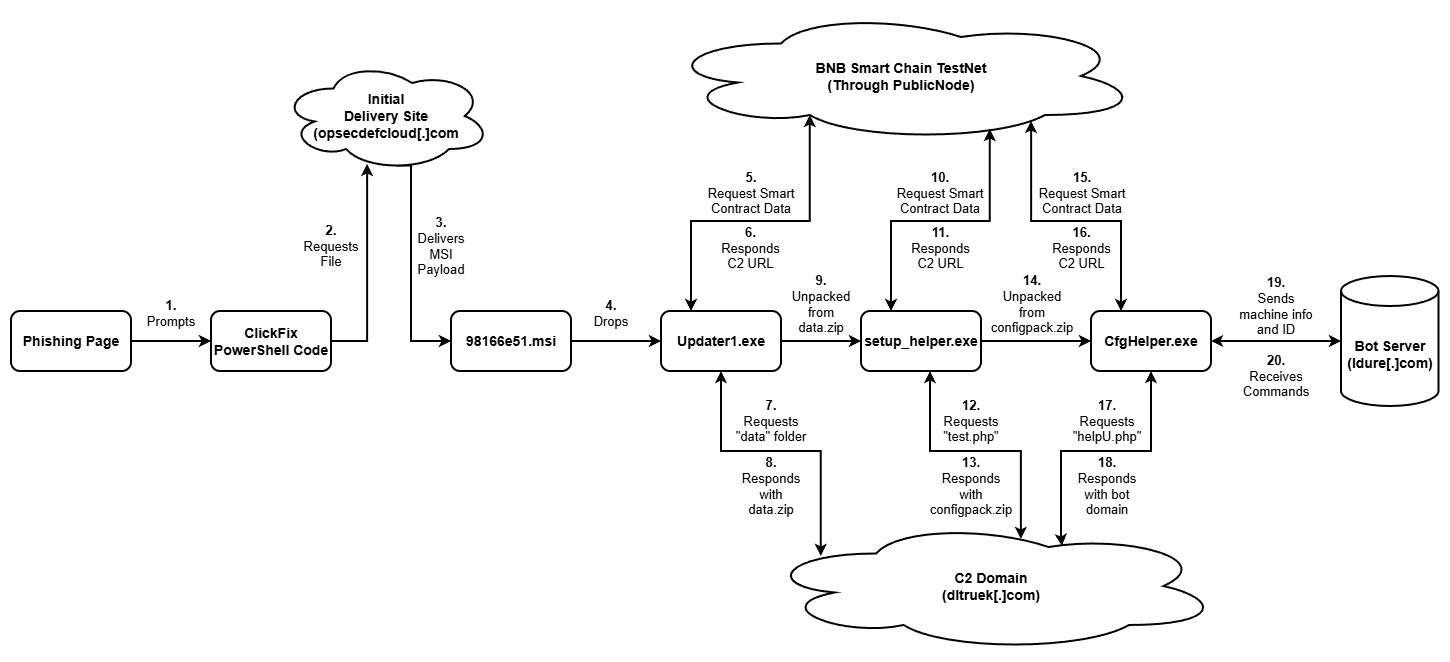
This campaign shows a key example of how devices can be brought into networks of infected computers. A full attack diagram of the campaign’s execution chain is shown in Figure 19.
It also highlights how simple techniques such as typosquatting and ClickFix remain the chosen initial access methods for attacks with complex delivery chains. The efficient and effective nature of techniques such as ClickFix make them a key tool within attacks of all complexities. As such, it is important that organisations conduct effective training towards them. Additionally, organisations should look to implement effective defensive measures such as blocking PowerShell access for non-required devices or blocking specific web functions within PowerShell.
Overall, this is a complex multi-stage attack chain containing various persistence and defence evasion techniques. Combined together, these ensure that the malware is successfully delivered and that the campaign can operate for as long as possible.
TTPs
IOCs
Recommended for you



Get Started with CYJAX CTI
Empower Your Team. Strengthen Your Defences.CYJAX gives you the intelligence advantage: clear, validated insights that let your team act fast without being buried in noise.